Operational infrastructure
Practice administration
The work that surrounds billing — provider numbers, who can see what, which template goes to which patient, what was collected before the day — handled as practice infrastructure rather than as a set of side tasks.
The problem this solves
Billing software usually stops at the bill. The administration around it — keeping provider numbers current, controlling who can access financial data, standardising what patients are sent, collecting pre-operative information — falls to email, shared drives and individual habit.
That works until a practice adds a second doctor. After that, inconsistency between providers becomes the operational problem, and there is no record of who changed what.
Providers and access
Provider numbers and user accounts are administered centrally. Roles and permissions determine who can see financial information, who can lodge claims and who can change billing rules.
- Central provider number administration
- Role-based user permissions
- Separation between clinical and financial access
- Onboarding and offboarding of users
Templates and communications
Patient communications run from templates rather than from individual drafting. Consent forms, email and SMS templates can be customised on Anaemate Premium and Anaemate Groups.
- Standardised patient communications
- Customisable templates on Premium and Groups
- Custom “About me” and pre-operative sections
Calendar and pre-operative collection
Calendar management covers lists and sessions. Pre-operative questionnaires and surveys collect patient information before the day, with pre-operative and post-operative surveys included on the standard platform.
- Calendar and diary management
- Pre-operative questionnaires and surveys
- Post-operative surveys
- Advanced calendar management on Groups
Handover and audit history
Group configurations support handover between staff, and administrative changes are retained as history — which matters when a query arrives after the person who made the change has moved on.
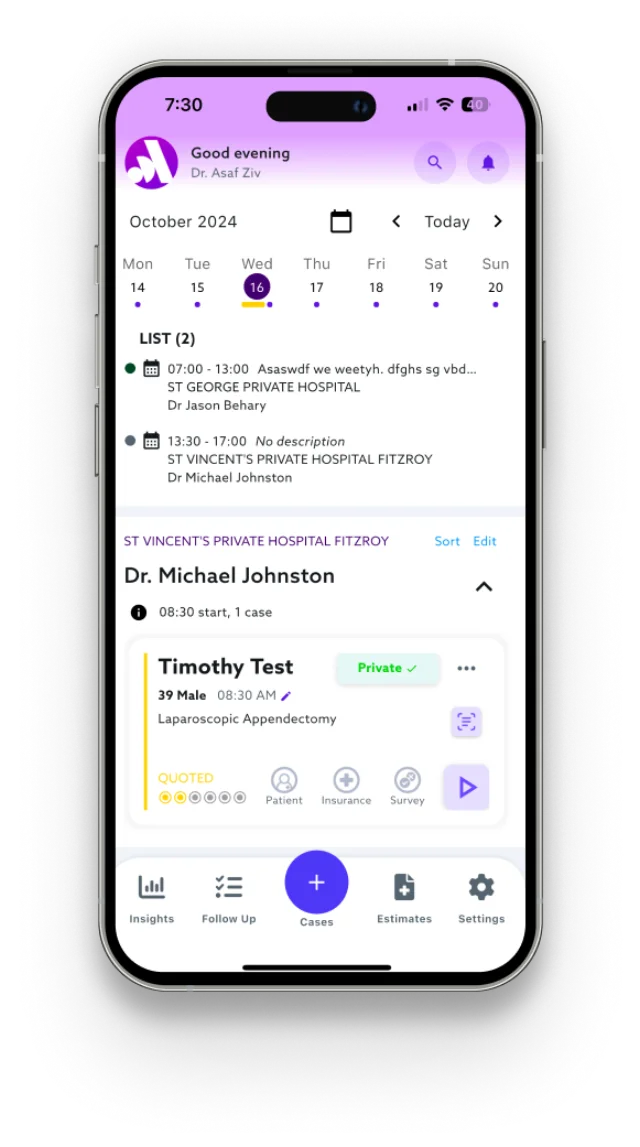
Reading this screen
- What you are viewing
- The cases and calendar view listing scheduled procedures.
- Who uses it
- Used by the anaesthetist and by practice administration.
- What it supports
- Seeing which cases are booked, captured and awaiting billing.
- What happens next
- Cases move into quoting and claiming from here.
Who does what
The same record, seen differently by each role
Practice manager
Administers users, providers, templates and permissions.
Billing staff
Works within the permissions and templates configured for them.
Group director
Sets policy that applies across every provider in the group.
Next step
Talk through how your practice bills today
A consultation covers how cases are captured, how quotes and consent are handled, where accounts are being lost, and what moving to Anaemate would involve for your practice or group.